Your shopping cart is empty.
DENT.PRO Hybrid Dental Simulator


DENT.PRO


Download:




0.0 lb


DENT.PRO Hybrid Dental Simulator
Item # BE.DENT-F
On Demand
Request a quote for pricing
Request a quote for pricing
Need an estimate?
Click Add To Quote

Features & Specifications
-
 by
by
A trusted GT partner -
1-Year Warranty
Provided by manufacturer -
 Gov't pricing
Available upon request
 by
by 
Frequently Bought Together
 (
(
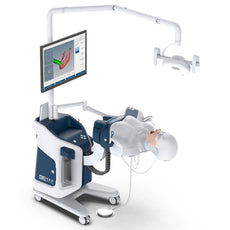
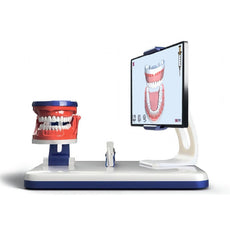
DENT.PRO is a unique simulator that combines performace of dental manipulations on a phantom with simultaneous 3D-visualization of every action on the screen in real-time. With its smart and aesthetic design, the simulator has futuristic appearance and ergonomic controls. The patented software provides an objective and automatic assessment of students’ skills and assists whether future dentists achieve high level of confidence and efficiency through high technology desicions and flexible human-machine interaction. DENT.PRO was created to train future dentists in anesthesiology, radiography, therapeutic, prosthodontics
DENT.PRO
Hybrid Dental Simulator
This is a unique simulator that combines tooth preparation on a phantom with simultaneous 3D-visualization of every action on the screen and automatic assessment of the performed procedure
DO NOT SETTLE FOR OUTDATED TRAINING METHODS. EMBRACE THE FUTURE OF DENTAL EDUCATION AND ELEVATE YOUR DENTAL TRAINING PROGRAMS WITH THE GROUNDBREAKING DENT.PRO
KEY FEATURES
1
Convenient work opportunities for both left-handers and right-handers2
Two opening positions of the mouth, like on a real human3
180 degrees head rotation4
Unique tracking system, with 6 DOF and high accuracy5
Outstanding 3D-visualization6
New ergonomic and modern styleRealistic environment
- Typodont with interchangeable teeth
- Real handpiece without any bulky trackers
- Feeling like working with a regular handpiece
- Simple and user-friendly calibration
- Repeatable and reversible preclinical training of clinical skills
Real time 3D-visualization
- AR enables the trainee to visualize the handpiece positioning in real time
- Real time feedback provided in 3D rendering similar to digital scanning
- Deformation of the virtual tooth according to the bur shape in reality
- Digital objective evaluation and tutorial feedback by recording the training processes
Have a Look at the Step-By-Step Training
Step 1 - Administration
Log in using your personal credentials and choose a case to start your training. More than 60 cases on 5 dental specialties are available.
Step 2 - Briefing
Every lesson begins with a briefing, which contains patient complaints, medical history and related images.
Step 3 - History taking
In the questionnaire a trainee can take a patient’s history by choosing related questions from the wide library, getting answers and adding the important ones to the patient’s card. What a wonderful way to develop the trainee’s clinical reasoning.
Step 4 - X-Ray
The simulator is equipped with a special positioner to learn how to obtain a proper positing of a tooth on an X-ray image. An unlimited number of X-Ray images can be taken before or during the procedure without any harm to the trainee or patient. All images are saved in a library and can be used for debriefing.
Step 5 - Anesthesia
The anesthesia block is created to train different anesthesia techniques (periodontal anesthesia, nerve blocks, infiltration anesthesia) and determining a local anesthetic agent, vasoconstrictor type and a needle length. A trainee can visualize the anatomical structure of the jaw (its nervous and muscular systems) to choose the correct injection site. Feedback on injection site is given right on the simulated syringe (it turns red, yellow and green).
Step 6 - Preparation
The microsensors, mounted on the dental hand piece, are tracked in full 6DOF (6 Degrees-Of-Freedom) at speeds up to 240 Hz providing impressive accuracy of the performed manipulations. The tooth preparation cases, both operative and prosthetic, are developed by doctors for doctors.
Step 7 - Formative assessment
Any time you can switch to the slice-mode and review preparation shape, measure distances and angles. Educational hints such as optimal preparation or excessive tissue removal
Step 8 - Debriefing
Real video capture from the camera synchronized with 3D-player enabling the instructor to check ergonomic and posture. Real video capture eliminates issues of cheating during testing. Summative report is generated according to the trainee`s selection of relevant burs the taken parameters depending on what is tested. A teacher can also review all questions and answers from medical history, view the taken X-Ray images and evaluate preparation shaping in slices.
MORE SETTING OPTIONS
- Bench-type (mounted on a table)
- Standalone (selfcontained unit)
Download:
DENT.OPTIMAL
The dental trainer DENT.OPTIMAL is designed for manual skills training. Suitable for students, residents and dental specialists.
DENT.OPTIMAL trainer allows students to have trainings which reproduce real medical conditions and simulate the operation on the dental unit with a high level of accuracy. The real dental instruments are used on the trainer:- air/water syringe
- saliva ejector
- high-speed handpiece
- low-speed handpiece
- Operation tray
- Assistant tray
- Utility table
- Water suction/ supply control pedal
- Aspiration system
- Dental lamp
- Dental phantom
- Built-in lift mechanism
- External camera
FEATURES
- The manikin head has a universal model of the upper and lower jaw for preparation and restoration, with a soft gum and a set of 28 replaceable teeth, as well as a water drain
- The teeth are fastened screw-free to practice tooth extraction techniques
- The entire training process is recorded on a camera and a video file is saved for further debriefing.
DENT.OPTIMAL
With a library of lessons on different types of tooth preparations.- Anesthesia
- Orthodontics
- Orthopedic dentistry
- Therapeutic dentistry
- Surgical dentistry
BROADCASTING OPTION
An instructor can broadcast his/her performance of the procedure to the students’ trainers or each student
can
broadcast his/her performance to the instructor’s trainer.
Up to 6 students’ monitors can be viewed simultaneously at the lecturer’s training unit.
SKILLS
- Preparation for cavity and prosthodondics
- All types of cavity preparation according to the Black’s approach present on the teeth models
LESSON EDITOR
The trainer has a built-in lesson editor that allows an instructor to create and edit lessons, adjusting
the
trainer to the individual needs of each user.
The software is developed for training (both manual and communication skills), self-control and
examination.
Each lesson is a complete module with history data, images, visual instructions and videos on how to
perform
manipulations.
The Anesthesia module is represented by an interactive questionnaire, where the student takes history
from a
virtual patient in a live chat mode. Based on the results of this survey, the type of anesthesia and the
rest of parameters are selected.
Related Products



by — Item # BE.DENT-F
DENT.PRO Hybrid Dental Simulator
On Demand
Request a quote for pricing
Request a quote for pricing
Add to Cart
Add to Quote